Broadcom shipped a set of Legacy Custom Page migration tools in Q2 2026, the first automated help for the App SDK end-of-life since the October 31, 2026 deadline was announced. If you manage a Rally subscription with legacy custom pages, it's worth running the dashboard this week.
What It Does
The tools live at Reports > Legacy Custom Pages. The dashboard shows every legacy page in your subscription sorted by usage traffic (High / Medium / Low) and tracks each page through three states: Unconverted, Linked (in progress), and Replaced.
From there, admins can convert in one click, link the old and new pages for side-by-side review, replace the legacy page in nav and permissions once satisfied, and download a CSV error log of anything that didn't convert automatically.
The tool converts Rally's own apps, the native widgets Broadcom ships with the platform. Custom List, Progress, Query Tile, Bar Chart, and other out-of-the-box apps can move automatically when they're sitting on a legacy page.
What It Doesn't Do
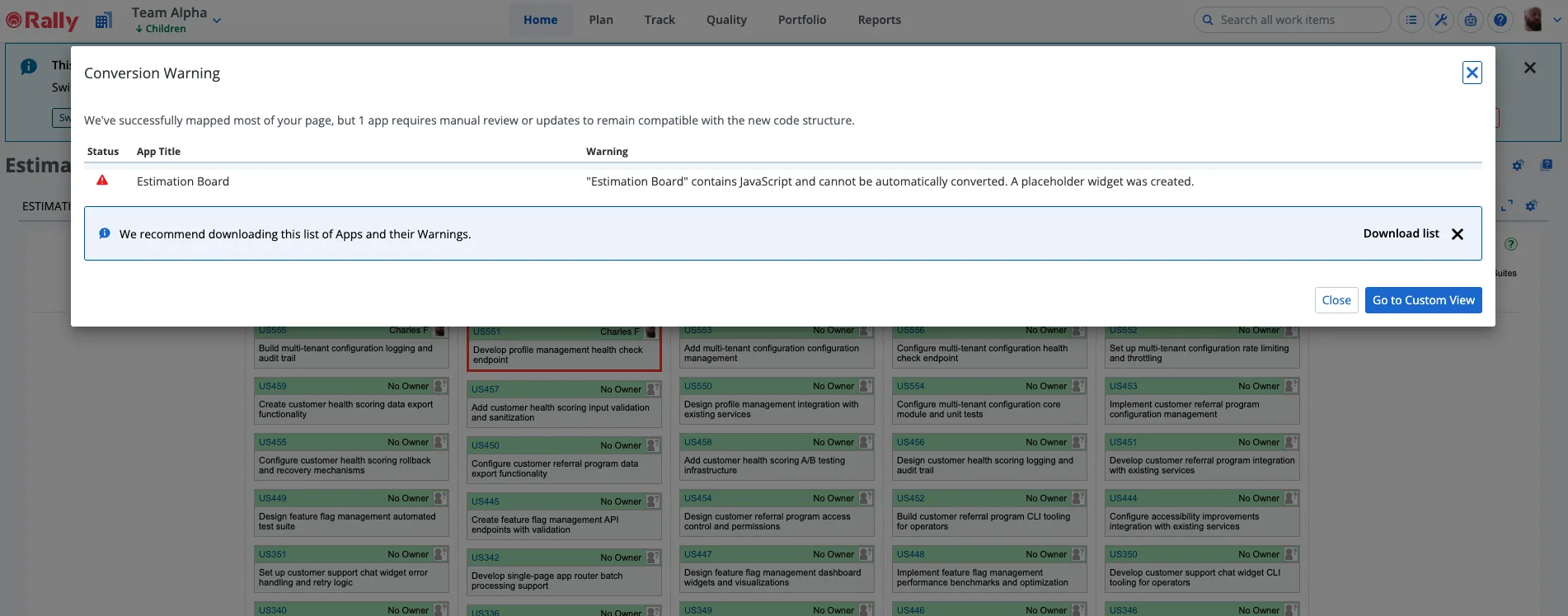
Custom HTML apps, anything with JavaScript, do not convert. The tool creates a placeholder widget in their place and flags them in the error log. The warning text is explicit:

"Custom HTML contains JavaScript and cannot be automatically converted. A placeholder widget was created."
The downloaded CSV looks like this:
Status,App Title,Warning
Error,Estimation Board,"""Estimation Board"" contains JavaScript and cannot be automatically converted. A placeholder widget was created."
The placeholder means the page still shows as converted in the dashboard, but those apps are gone until you rebuild them. If you click through to the new Custom View without checking the error log, you'll find empty slots where your custom apps used to be.
This isn't a flaw, it's the scope. Broadcom built this to migrate their own apps. Custom-built apps are a manual rebuild, same as before.
What to Do Now
Run the dashboard and look at your high-traffic pages first. Pages built entirely from native Rally widgets are good candidates for one-click conversion. Pages with Custom HTML apps will show up in the error log and need manual work regardless of what the tool does.
The downloadable error log is worth saving, it gives you a clean inventory of exactly which apps on each page couldn't be converted automatically. That's useful input for scoping the rebuild work before October.
WidgetAI Picks Up Where Rally's Tool Stops
Every row in that error log is an app Rally's tool can't migrate, a Custom HTML widget that needs to become a React widget before October. That's exactly what we built WidgetAI for.
Drag the legacy app file onto WidgetAI and you get back a typed React project: typed models, a WSAPI hook, the components mapped from your ExtJS xtypes, and a migration report explaining what was converted and what still needs a human eye. Trained on the largest combined catalog of Rally apps in the world.
If your error log is longer than you were hoping, talk to us about a WidgetAI pilot.
Related reading:
- The Rally App SDK Migration Guide, How to inventory and replace your custom apps before October
- Rally's Built-In Tool for Finding All Your Custom Pages, The inventory dashboard most admins don't know about
- Rally Q1 2026 Roundup, 20+ features from the biggest Custom Views quarter yet
First automated migration tooling from Broadcom. Better late than never, but October is closer than it looks.